
To work with Boost Express as an event organizer, you need to create an account. Registration gives you access to the organizer dashboard, where you can set up events, manage audiences, and connect advertising accounts.
Account setup
To register, go to the Sign Up page.
-
Enter your email address and create a password.
- You can also sign up with your Google account instead of creating a new password.
-
Review and accept the required agreements.
- You must agree to the Privacy Policy, Terms & Conditions, and Organizer Service Agreement before proceeding.
-
Click Sign up.

Profile details

Company details

Adding your first event
Next, you’ll set up your first event by filling in its basic details.
Event images have specific requirements:
-
Event logo must be a square image in JPG or PNG format, up to 10 MB
-
Hero image should be a wide banner at least 1400 px wide — it’s used on the event page
You’ll also need to provide general event information such as the event name, dates, location, category, description, website URL, and the estimated number of participants.
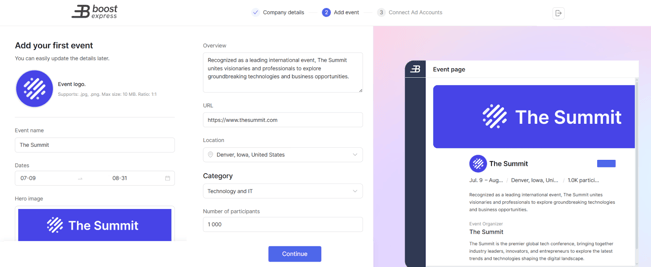
Once complete, click Continue.
Connecting Ad Accounts
The final step is connecting advertising accounts. This allows all sponsor campaigns for your event to run through the ad account you select.
Note: You can only connect one ad account per platform for each event.
You can also skip this step during registration and connect accounts later from the event settings.
- Select the advertising platform you want to connect.
- Sign in and authorize Boost Express to manage campaigns for that account.
- Confirm the account connection.

Click Continue to finish setup.
Next steps
- Configure event settings to prepare everything required to publish your event.
- Learn about creating and managin audiences for your events.
- Set up a subdomain for landing pages to host the landing pages linked from sponsor ads.