
Learn how billing works in Boost Express. This page covers payment methods, balance management, and billing details for sponsors.
Payment method
You can add a payment card to fund your campaigns and subscriptions.
- Open your profile menu in the top-right corner and select Billing
- In the Payment method section, click + Add card
- Choose how you want to pay:
- Card — enter your card number, expiration date, CVC, and country
- Bank account — provide your account details for payments
- Click Save to confirm
After adding a card:
- To make it the default, open the menu next to it and select Set as default
- To remove a card, select Delete card from the menu

Balance and automatic payments
Your Boost Express account has a balance used to pay for advertising services.

You can add funds manually at any time by clicking Top up. A panel will open where you can enter the amount or select one of the preset options. The payment will then be charged to your saved card and credited to your balance.

Boost Express also supports automatic payments, which recharge your balance when it falls below the threshold. For more details about how this option works, see the article Automatic Payments.
Billing information
The Billing information section stores details that appear on your invoices. Click Edit to update fields like billing contact, company name, address, and VAT number.
VAT number is a tax identification number used for value-added tax purposes. It’s typically required if your company is registered for VAT in your country.
Billing history and invoices
The Billing history table provides a detailed overview of your account charges over time.
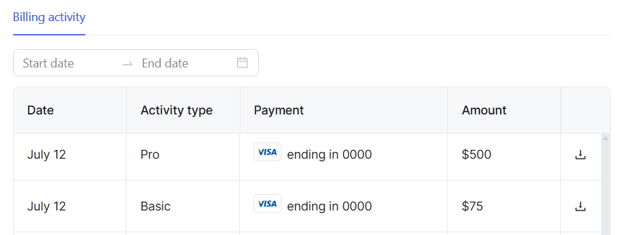
Each row includes the date, activity type, payment method, and amount. You can use the date range filter at the top to narrow down the results. To download a PDF invoice for any transaction, click the ⭳ icon in the last column.
›︎ What payment methods are available?
You can pay with a credit or debit card from major providers such as Visa, Mastercard, and American Express, or connect a bank account.
›︎ What currencies are supported?
All balances, payments, and reports in Boost Express are shown in USD. If your payment card is in another currency, conversion will be handled automatically by your bank at its exchange rate.
›︎ When is a VAT number required?
A VAT (Value Added Tax) number is generally required if your business is registered for VAT in your country and needs to issue compliant invoices. To verify your VAT status or validate a VAT number, you can use official tools like the European Commission’s VIES.